|
Main Page |

  
|
|
Main Page |
|
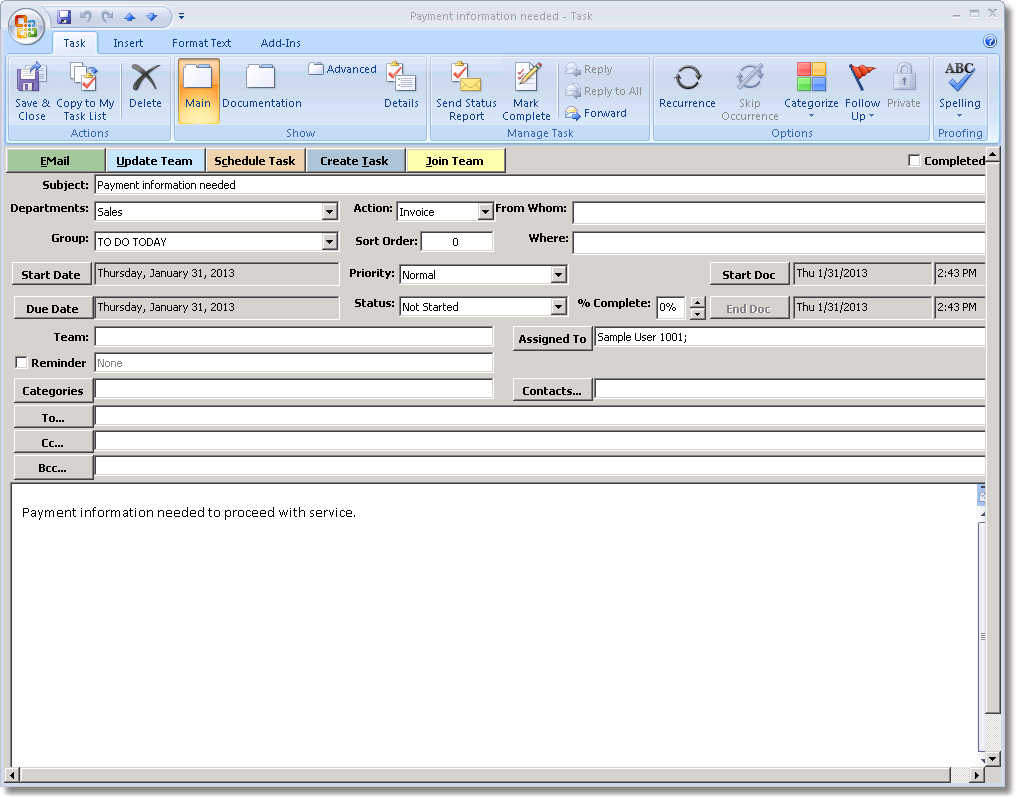
TaskController Task Fields
Field |
Description |
TaskController View |
Subject |
A descriptive name for the task. |
Yes |
Departments |
The department assigned responsibility for the Task. By default this determines in which grouping queue the Task appears. |
No |
From Whom |
The originator of the Task, usually for whom the Task is being done. This can be set and changed manually. |
Yes |
Group |
The group type of the Task. By default this determines in which grouping queue the Task appears. |
No |
Where |
The location where the task is to be performed. |
Yes |
Sort Order |
A field that can be added to the grouping fields or simply sorted on in the queue. |
Yes |
Priority |
An alternate sorting field. |
No |
Status |
The state in which the Task was last left. |
No |
Due Date |
When the Task is due to be completed. |
Yes |
Start Date |
When work initially began or will begin on the Task. |
Yes |
% Complete |
The proportion of work accomplished on the Task. |
Yes |
Complete |
Whether the Task has been completed. Checking this box sets % Complete to 100 and strikes the name of the Task in the Task list view. See Completing a Task for more information. |
Yes |
Start |
Sets the start date and time for the current work session on the Task. This is the same as clicking the Start button on the Documentation Page. |
No |
End |
Sets the end date and time for the current work session on the Task. This is the same as clicking the End button on the Documentation Page. See the Documentation Tab section for more information on recording work time. |
No |
Team |
The team responsible for the Task or overall project. Team members will typically be included on all updates. |
No |
Assigned To |
The individual currently responsible for the task. Responsibility can be passed from one Team member to another, or across teams and departments. |
No |
Categories |
The standard list of Task categories available through Outlook. See the Outlook help topic About Categories for more information. |
No |
To |
The primary recipient of the current update. Should not be addressed to any person that appears in another selected address field (Team, Contacts, Assigned To) or the addressee will receive duplicate updates. |
No |
Contacts |
Additional contacts that may be included on broader updates and announcements. |
No |
Cc |
The standard carbon copy field. |
No |
Bcc |
The blind carbon copy field. These addressees will not be displayed on the received email. |
No |
Body |
The content of the body of the task. Typically a summary. Task history is kept in the Documentation Page. |
No |
Fill out the fields as appropriate for your task.
When clicking Due Date or Start Date, a date chooser will appear:
Date Chooser
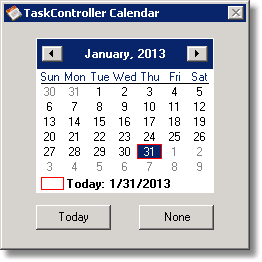
When choosing a date you must either double-click the date or press Enter to select it.