|
Recovering a Task |

  
|
|
Recovering a Task |
|
If a task is deleted from a TaskController folder and needs to be recovered, you may use Outlook's Recover Deleted Items function to retrieve it.
Note: you should archive your TaskController tasks to the Completed folder as described in the section Completing a Task.
Follow these steps:
Recover Deleted Items
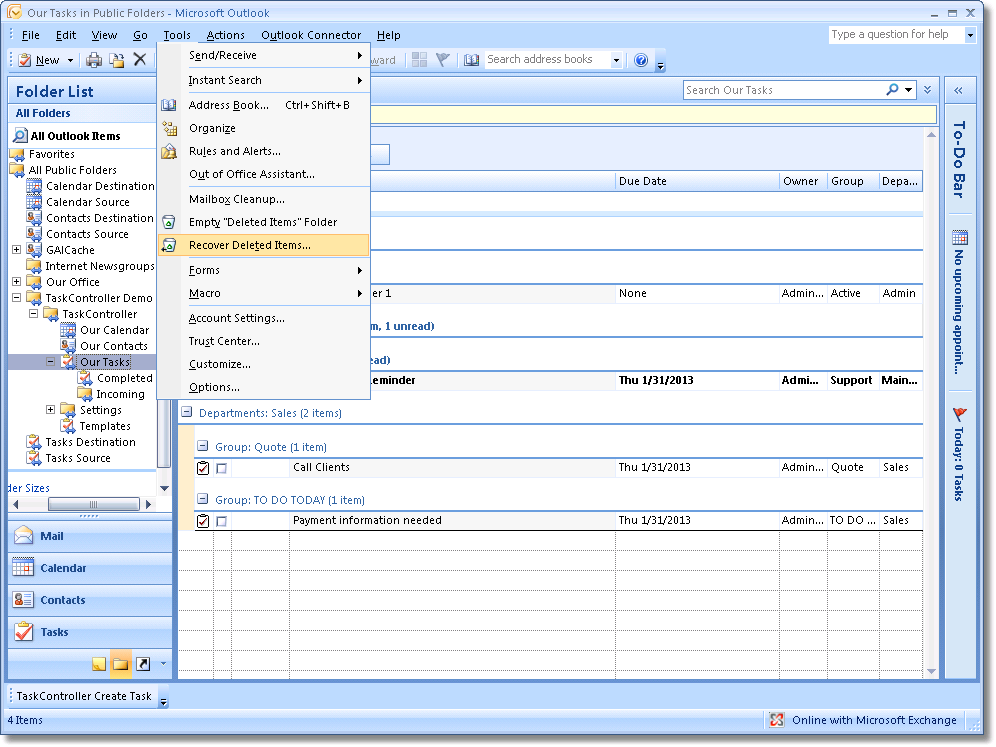
| 1. | Highlight the folder within Outlook. |
| 2. | From the Tools menu select Recover Deleted Items. |
Recover Deleted Items
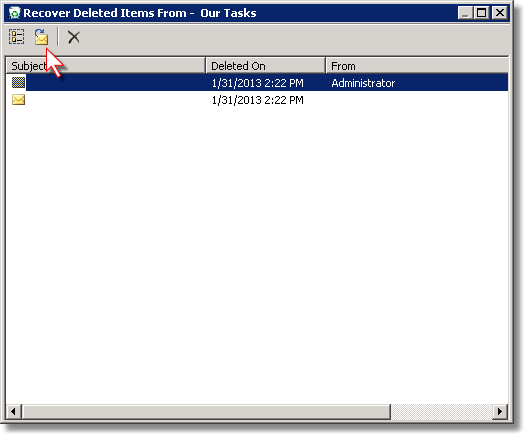
| 3. | Select the task you wish to recover. |
| 4. | Click the recover items button (indicated by the red cursor). |
See the Outlook on-line help topic Retrieve a Deleted Item